Payouts on the Perpetuals One-Stage Challenge
Profit share, payout cap, minimum payout and payout interval on the Simulated Funded Account from a Perpetuals One-Stage Challenge.
Payouts on the Perpetuals One-Stage Challenge work differently from our CFD accounts. Your profit share depends on how much profit you leave in the account, and a payout cap limits each payout so your account keeps a buffer.
Profit share
The share applies to the whole payout.
ℹ️ The 90% Profit Share option raises both shares by 10%. It does not remove the lower share. With this option, a payout that leaves less than half of your available profit in the account is paid at 70%.
From your first payout, your Max Loss floor sits at your starting balance. The profit you leave in the account is your buffer, so a larger buffer earns a larger share. See Max Loss on the Perpetuals One-Stage Challenge.
Payout cap
Your first payout is capped at 3%, 4% or 5% of your starting balance, depending on your option. The cap rises by 1% with every payout, with no ceiling. The cap limits the profit you withdraw, before your profit share is applied.
Payouts and your loss limits
Your Daily Loss limit is adjusted by the amount you withdraw from the account, so a payout never counts as a daily loss.
Your Max Loss is not adjusted. From your first payout the floor sits at your starting balance, and the profit you withdraw no longer sits above it as a buffer.
Minimum payout and payout interval
The smallest payout you can request is 1% of your starting balance: $1,000 on a 100K account.
You can request a payout every 7 days, or every day with the daily Payout Interval option.
You need a Consistency Score within your limit to request a payout. See Perpetuals One-Stage Challenge.
Requesting a payout on Perpetuals
As on every PipFarm account, close all your open positions before you request a payout.
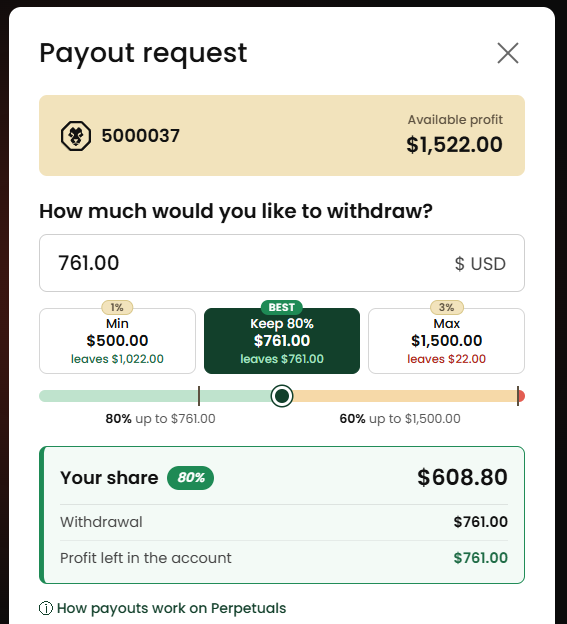
The payout request shows your available profit and three buttons that fill in the amount for you:
Min: the minimum payout, 1% of your starting balance.
Keep: exactly half of your available profit. This is the most you can withdraw at your higher profit share, and the button shows that share.
Max: your payout cap, or all of your available profit once the cap covers it.
Under each button you can see how much profit it leaves in the account. The bar shows where the higher share ends and the lower share starts. Your share shows the amount you receive and the profit left in the account.
Example
A 50K account has $1,600 of available profit on its first payout. The cap is $1,500 (3%) and the minimum is $500 (1%).
Withdrawing all your profit
You can withdraw all your available profit once your payout cap covers it. A full withdrawal is paid at 60%, or 70% with the 90% Profit Share option, and it breaches the account, because no buffer is left above your floor. The payout request asks you to confirm before you send it.
Frequently asked questions
Why was my payout paid at a lower share?
Why was my payout paid at a lower share?
Does a payout count towards my Daily Loss?
Does a payout count towards my Daily Loss?
A payout does not count towards your Daily Loss. Your Daily Loss limit is adjusted by the amount you withdraw from the account. Your Max Loss is not adjusted, so the profit you withdraw no longer sits above your floor as a buffer.
Can I withdraw more than my payout cap?
Can I withdraw more than my payout cap?
Your payout cap limits every payout, including a full withdrawal. The cap rises by 1% with each payout, so you can withdraw more next time.
Does my Consistency Score reset after a payout?
Does my Consistency Score reset after a payout?
Your Consistency Score on a Perpetuals One-Stage Simulated Funded Account does not reset after a payout. It counts all profit since the funded account started, including profit you have withdrawn.
Was this helpful?