Customising Your Challenge
The rules you can change when you buy a Perpetuals One-Stage Challenge: Time Limit, Daily Loss, Consistency Score, Profit Share, First Payout Cap and Payout Interval.
When you buy a Perpetuals One-Stage Challenge, you can change several of its rules in the Customise Your Challenge section at checkout. Each rule has several options. Options that add to the challenge price are upgrades, and the price of each is shown at checkout.
Your settings apply to the Challenge and carry over to your Simulated Funded Account. Once you have bought your Challenge, you can't change its settings or upgrades.
The image below shows a 5K Balance Trailing account with the first option of each rule selected. Use the − and + buttons to change a rule. Rules without buttons are the same on every account.
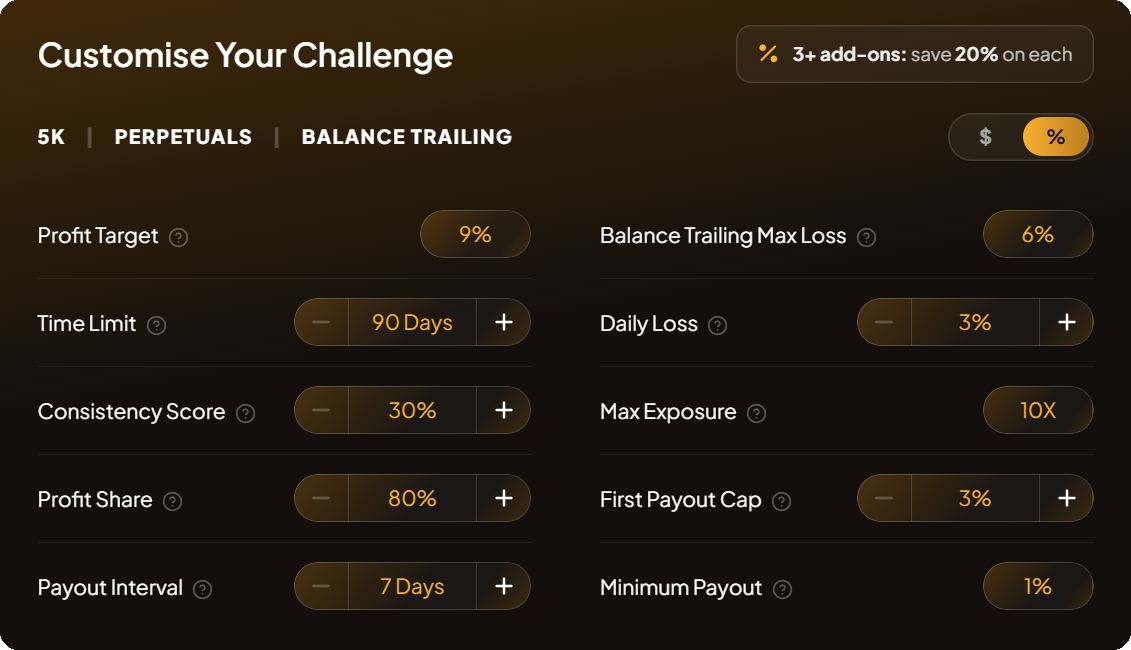
Rules with options
Time Limit
Choose 90 days, 180 days, 360 days or Unlimited. This is the time you have to pass the Challenge, and to reach each payout once funded. See Inactivity period and maximum time limit.
Daily Loss
Choose 3% or 4%, or turn the Daily Loss off. The Daily Loss is measured from the higher of your balance or equity at the start of the day. See Max Daily Loss Rule Explained.
Consistency Score
Choose 30% or 50%, or turn it off. Your best day can be at most that share of your total profit, in the Challenge and on your Simulated Funded Account. Off removes the consistency check from both. Your Max Exposure follows it: 10X at 30%, 5X at 50% and 3X with it off. See Max Exposure.
Profit Share
Choose 80% or 90%. With 80%, you keep 80% of a payout when you leave at least half of your available profit in the account, and 60% when you take more. The 90% option raises both shares by 10%, to 90% and 70%. It does not remove the lower share, so a payout that takes more than half of your profit is paid at 70%. See Payouts on the Perpetuals One-Stage Challenge.
First Payout Cap
Choose 3%, 4% or 5% of your starting balance as the cap on your first payout. The cap rises by 1% with every payout, with no ceiling.
Payout Interval
Choose to request payouts every 7 days or daily once funded.
ℹ️ The $ / % switch at the top of the section shows each rule as a percentage or as a dollar amount for your account size.
Rules that are the same on every account
Other upgrades
Two more upgrades are available on the One-Stage Challenge:
Challenge Fee Refund: your challenge fee is added to the balance of your Simulated Funded Account as profit.
Challenge Retry: if you breach a trading rule during the Challenge, you get one new Challenge with the same settings.
Upgrade bundle discount
Choose three or more upgrades and you get 20% off each of them. Upgrades are the rule options that add to the price, plus Challenge Fee Refund and Challenge Retry. The discount applies to every qualifying upgrade in your basket, whether you choose three, four or more.
The Time Limit upgrades (180 days, 360 days and Unlimited) are not included in this offer and do not count towards the three.
Frequently asked questions
Which upgrades count towards the bundle discount?
Which upgrades count towards the bundle discount?
Every upgrade counts towards the bundle discount except the Time Limit upgrades. That covers the rule options that add to the price, Challenge Fee Refund and Challenge Retry.
Can I change my settings after I buy?
Can I change my settings after I buy?
Your Challenge settings can't be changed after you buy. The settings and upgrades you choose at checkout stay the same on the Challenge and on your Simulated Funded Account.
Do discount codes apply to upgrades?
Do discount codes apply to upgrades?
Discount codes reduce the challenge price only. They do not reduce the price of your upgrades.
Was this helpful?