Introduce a Friend
How to earn rewards by referring new traders to PipFarm
The Introduce a Friend program lets you earn rewards by inviting new traders to join PipFarm. When someone signs up with your referral link and makes a purchase, you and your friend both receive a reward.
How it works
To access the Introduce a Friend feature, you need to meet two requirements:
You've purchased a PipFarm challenge before
You've completed identity verification
Once both are met, your referral options are available in the Settings menu of your dashboard.
Where to find your referral links
Log in at app.pipfarm.com
Click the cog icon ⚙️ in the top right to open Settings
Scroll to the Introduce a Friend section
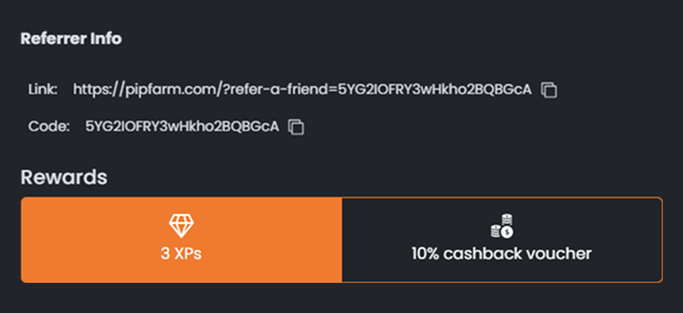
You'll find two referral links, each with a different reward. You can choose which one to share based on the reward you'd like to give and receive.
Using referral links
There are two ways your friend can use your referral.
Clicking the referral link
If your friend signs up using your referral link, the referral is automatically tracked and the reward is applied after their first purchase.
Entering the referral code at checkout
If your friend visits PipFarm directly without clicking the link, they can enter your referral code manually on the checkout page. New customers will see a box labelled "Enter referral code" — entering the code connects the purchase to you.
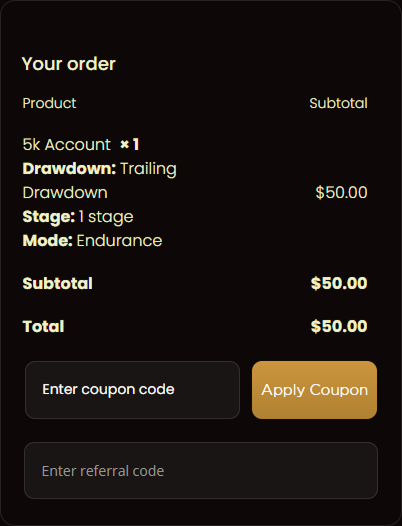
⚠️ If the referral code input box does not appear during checkout, it means the person has already registered or made a purchase and is not eligible to use a referral.
Referral rewards
When someone signs up using your link and they are a new PipFarm customer, both you and your friend receive the same reward. You can choose between:
ℹ️ Referral rewards are only granted for your friend's first purchase. Subsequent purchases do not count toward additional rewards.
Confirmation
Once your friend completes their first purchase using your referral link or code, you'll both receive a confirmation email with details of the reward and how to redeem it.

Compatibility with promotions
Your referral reward is separate from promotional discounts and gift vouchers. There is a dedicated input field at checkout for referral codes, and it does not conflict with promotional coupons. You can benefit from both a referral reward and a promotion in the same purchase.
Frequently asked questions
Who is eligible to use a referral code?
Who is eligible to use a referral code?
Only new traders who have never created an account or made a purchase on PipFarm. Existing users and free accounts are not eligible.
Can I earn rewards for more than one referral?
Can I earn rewards for more than one referral?
Yes — you can refer as many new traders as you'd like. Each successful referral earns you a reward, but only the referred friend's first purchase counts.
Can I refer someone in my household?
Can I refer someone in my household?
No. You cannot refer someone from your own household. PipFarm allows only one trader per family or household, and this cannot be waived — it applies to family members, roommates, or anyone sharing a home address. For full details, see Who cannot join PipFarm?
What happens if someone abuses the referral system?
What happens if someone abuses the referral system?
Abuse of the referral system may result in the removal of rewards and further account actions. Please only refer genuine traders.
Can I use Introduce a Friend if I'm an affiliate?
Can I use Introduce a Friend if I'm an affiliate?
No. The Introduce a Friend program and the affiliate program cannot be used together. If you are an active affiliate, purchases made through your Introduce a Friend links will still be tracked and recorded. However, your affiliate commissions for those purchases will be disqualified. You should use your affiliate link instead.
Related articles
Was this helpful?
Still need help? Share an idea