Max Risk
How Max Risk measures your combined realised and unrealised loss at any given time within a Risk Window.
Max Risk measures the total amount your account has lost, realised and unrealised, at any given time within a Risk Window. It operates in real time from your Dashboard.
Max Risk is the measurement behind Pip Protector. Your Max Risk Limit is a percentage of your account's starting balance. The percentage, and what happens when you reach it, are set by the rules of the account you are trading.
ℹ️ Some accounts run Max Risk through the Pip Protector strike system, where each Strike tightens the limit. On others, the Max Risk Limit is absolute and reaching it breaches the account immediately. The rules article for your account confirms which applies.
How it works
Max Risk is built around three core concepts.
Max Risk Reference Balance
When you open your first position, the Dashboard records your account balance at that moment. This becomes your Max Risk Reference Balance, the baseline against which losses are measured throughout the Risk Window.
The Reference Balance acts as a high watermark. If a profitable trade takes your balance to a new high within the same Risk Window, the Reference Balance rises to match it, so profits do not create additional room to lose.
Risk Window
A Risk Window begins the moment you open your first position. It does not end when you close positions. The Window only resets after you have been flat for a continuous 60 minutes. This flat period is known as Cooling Down. Once the cooldown completes, a new Risk Window opens with your next trade.
Max Risk Limit
The Max Risk Limit is the maximum realised and unrealised loss you can carry within a single Risk Window. It is expressed as a percentage of your account's starting balance and is calculated for you in real time on your Dashboard.
What happens when you reach the limit
When your combined realised and unrealised loss within a Risk Window reaches the Max Risk Limit, all open positions are closed automatically.
What follows depends on your account. Where Max Risk runs through the Pip Protector strike system, a Strike is recorded and your Max Risk Limit is halved, with the consequences escalating at each further Strike. Where the Max Risk Limit is absolute, reaching it breaches the account immediately, with no strikes and no escalation.
Example
This example uses a $10,000 account with a 2% Max Risk Limit, which is $200. The percentage differs between accounts, but the calculation is the same on all of them.
ℹ️ Max Risk counts realised and unrealised losses together and accumulates them across every trade in the same Risk Window. The Window only resets after you have been flat for a continuous 60 minutes (Cooling Down), at which point your next trade starts a fresh Window with a new Reference Balance.
Dashboard indicators
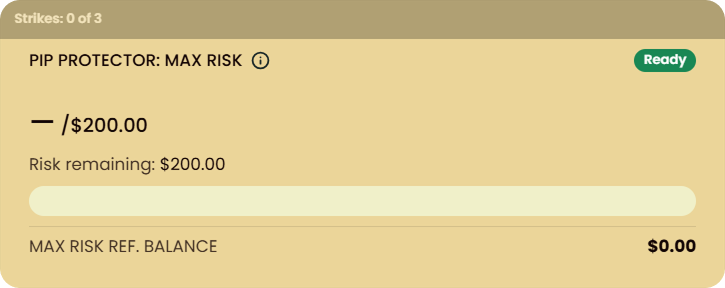
Default (Ready)
No positions are open. Your full risk allowance is available, and the Risk Window has not started.
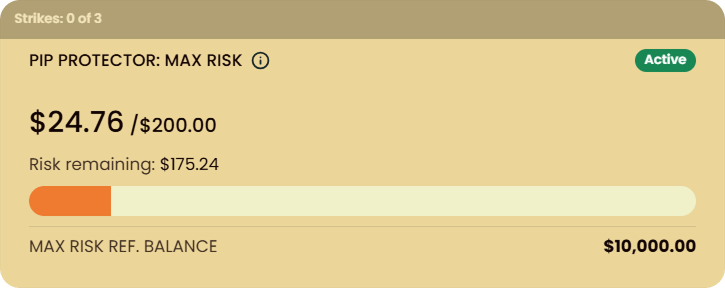
Open Risk (Active)
Positions are open. The Dashboard shows your current risk utilisation against your Max Risk Limit in real time.
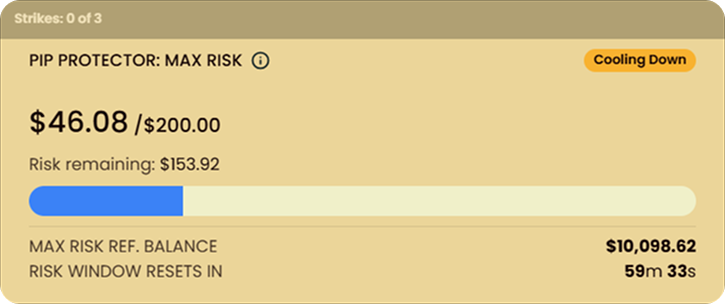
Flat (Cooling Down)
All positions are voluntarily closed. The cooldown countdown shows how long until your Risk Window resets.
Frequently asked questions
Where do I find my Max Risk Limit?
Where do I find my Max Risk Limit?
It is shown on your Dashboard whenever you have positions open, and it is listed in the rules article for your account.
Does the Risk Window reset at the end of the trading day?
Does the Risk Window reset at the end of the trading day?
No. The Risk Window resets based on your trading activity, not the calendar. It only resets once you have been fully flat, with no open positions, for a continuous 60 minutes.
What if I make a profit during a Risk Window?
What if I make a profit during a Risk Window?
Your Max Risk Reference Balance rises as your balance rises. This means profits do not create additional room to lose, because the limit always applies relative to your highest recorded balance within the Risk Window.
Can I increase my Max Risk Limit?
Can I increase my Max Risk Limit?
On Instant Accounts, the Extra Max Risk Add-On doubles the limit. It is bought at checkout.
Does Max Risk apply during a Challenge?
Does Max Risk apply during a Challenge?
It depends on the Challenge. Some Challenges do not enforce Max Risk at all, and others apply it as an absolute limit that breaches the Challenge when reached. The rules article for your Challenge confirms which.
Does this rule interact with Max Daily Loss or Max Loss?
Does this rule interact with Max Daily Loss or Max Loss?
No. Max Risk operates independently of Max Daily Loss and Max Loss. Those rules can still be reached separately.
Can I track my Max Risk status in real time?
Can I track my Max Risk status in real time?
Yes. Your Dashboard shows live utilisation against the Max Risk Limit whenever positions are open, and displays the cooldown countdown when you are flat.
Related articles
Was this helpful?
Still need help? Share an idea