Kill Switch guide
Automatically close all positions when your equity hits a stop loss or take profit level
The Kill Switch is a built-in equity protection tool available in your PipFarm dashboard. It automatically closes all open positions when your account equity hits a level you define — either a stop loss (minimum equity) or a take profit (target equity). Think of it as an account-wide safety net that works alongside your individual trade stop losses.
ℹ️ The Kill Switch is available on all PipFarm challenge and funded accounts. You can configure it at any time from your dashboard. The Kill Switch is per account — you need to set it up individually on each account you want to protect.
🚨 The Kill Switch executes at market price. It is not guaranteed that your closing balance will exactly match the value you set. During fast-moving markets, price gaps, or high-impact news events, slippage can occur. Always add a buffer to your Kill Switch levels.
Kill Switch stop loss
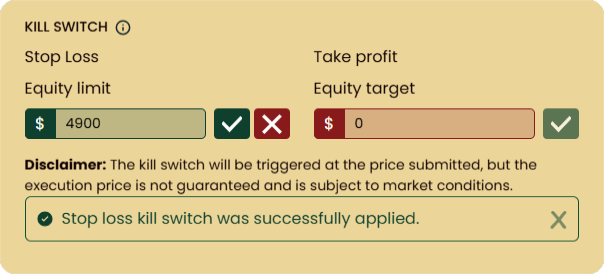
The stop loss helps protect your account from breaching your daily loss limit. Enter the equity value you do not want your account to fall below. This value should be:
Below your current equity
Above your daily loss limit
Click the green tick to activate. You will see a confirmation message if accepted, or an error if the value is out of range.
Example: You have a $50,000 account with a daily loss limit of $48,500. You set the Kill Switch stop loss to $49,000. Once equity reaches $49,000, all positions are closed at market price.
Kill Switch take profit
The take profit locks in your gains when equity reaches your target. Enter the equity value you want to close out at. This value must be above your current equity.
Click the green tick to activate. You will see a confirmation message if accepted, or an error if the value is too low.
Example: You have a $10,000 account with a profit target of $11,200. You set the Kill Switch take profit to $11,210. Once equity hits $11,210, all positions are closed at market price.
Modifying or deactivating the Kill Switch
Deactivate: Click the red cross next to the active Kill Switch. You will see a confirmation message.
Modify: Enter a new value and click the green tick. The previous value is replaced immediately.
Once triggered, the Kill Switch automatically deactivates, and you will receive an email notification. You can continue trading immediately after it triggers — the Kill Switch only closes your open positions, it does not lock or restrict your account. If you want to use it again, simply set a new value.
Frequently asked questions
Does the Kill Switch stop me from trading?
Does the Kill Switch stop me from trading?
No. The Kill Switch does not lock your account or prevent you from opening new trades. It simply closes all open positions when your equity reaches the level you set. You can immediately open new positions after it triggers.
Will the Kill Switch protect me during news releases?
Will the Kill Switch protect me during news releases?
Not necessarily. The Kill Switch closes positions at the best available market price, but volatile conditions during high-impact news can cause slippage. Your closing equity may differ from the value you entered. Always use a buffer.
Can I use both stop loss and take profit at the same time?
Can I use both stop loss and take profit at the same time?
Yes. You can set both a stop loss and a take profit simultaneously. Whichever level is hit first will trigger, closing all positions.
Do I need to set the Kill Switch on each account?
Do I need to set the Kill Switch on each account?
Yes. The Kill Switch is configured per account. If you have multiple challenge or funded accounts, you need to set it up on each one individually from that account’s dashboard.
Does the Kill Switch work when I am not logged in?
Does the Kill Switch work when I am not logged in?
Yes. The Kill Switch runs server-side and monitors your equity continuously, whether or not you are logged into your dashboard.
Was this helpful?
Still need help? Share an idea