PipFarm Dashboard guide
A walkthrough of the PipFarm Dashboard — account switching, rules, Kill Switch, metrics, profit share, time-based rules, daily loss reset, XP, daily summary, and settings.
The PipFarm Dashboard is where you track the progress of your challenges and Simulated Funded Accounts. You can access it at app.pipfarm.com. Everything updates in real time — no need to refresh the page. This guide walks through each section of the Dashboard.
Switching Accounts
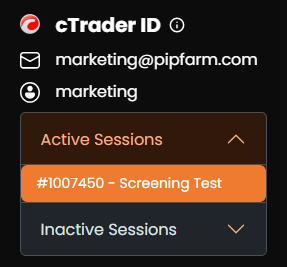
The dropdown menu in the top-left corner lets you expand and collapse your active and inactive accounts, so you can quickly switch between them.
Rules
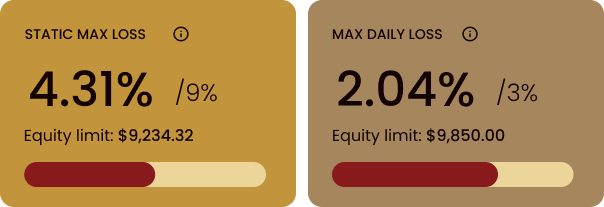
The second row tracks your two most important rules — Max Loss and Max Daily Loss. This section shows your current equity limits in USD and percentage, plus a progress bar indicating how close you are to reaching each limit.
Kill Switch
The Kill Switch sits in the middle of your Dashboard. It's an equity-based take-profit and stop-loss feature that automatically closes all positions in your cTrader account. It's useful for locking in a profit target or preventing further losses before they reach your Max Daily Loss. For full details, see the Kill Switch guide.

Metrics
Below the rules, the Dashboard shows key metrics used in rule calculations:
High Watermark: The highest value your account has reached. Used to calculate the EOD Trailing Max Loss. Not relevant for static drawdown accounts, but still displayed.
Previous EOD Reference: The higher of account balance or equity recorded at 22:00 GMT (or 21:00 GMT during U.S. Daylight Savings) on the previous day. Used to calculate Max Daily Loss.
Equity: Your current cTrader account equity. May deviate marginally from values shown in cTrader due to latency and rounding.
Balance: Your current cTrader account balance.
Profit Target and Profit Share
The Dashboard shows your progress toward your profit target (for passing the challenge or scaling the account) and your current profit share split.

Time-Based Rules
The bottom row tracks the time-based rules that apply to your challenge and Simulated Funded Accounts.

Time Limit: Each stage of your account — challenge or Simulated Funded — has a 90-day time limit (unless you purchased the Extended Time Limit add-on). A new clock starts every time you move to a new stage.
Inactive Period: The number of days since your last trade. Accounts inactive for 28 consecutive days are closed.
Profitable Days: A trading day starts at 22:00 GMT and ends at 21:59 GMT. A profitable trading day is one where the closing EOD balance is at least 0.5% of the starting balance above the previous EOD reference.
Daily Loss Reset
Max Daily Loss resets at 22:05 GMT each day (21:05 GMT during U.S. Daylight Savings). The Dashboard shows a countdown timer so you always know when the next reset is.

XP and Rank
Your current XP and Rank are shown in the top-right corner of the Dashboard. For details on how the program works, see the Experience Program guide.
Daily Summary
The Daily Summary page breaks down your metrics day by day, making it easy to track performance over time and monitor progress against rules like profitable trading days.
Settings
Click the cog in the top menu to open Settings, where you can adjust your nickname for payout certificates and manage email preferences.

Frequently Asked Questions
Why is my Equity slightly different to what I see in cTrader?
Why is my Equity slightly different to what I see in cTrader?
Small differences between the Dashboard and cTrader are normal and are caused by latency and rounding. cTrader is always the source of truth for trade execution.
What does the Previous EOD Reference represent?
What does the Previous EOD Reference represent?
It's the higher of your balance or equity recorded at 22:00 GMT (or 21:00 GMT during U.S. Daylight Savings) on the previous day. Max Daily Loss is calculated against this value. See Max Daily Loss Rule Explained.
What happens if I don't trade for 28 days?
What happens if I don't trade for 28 days?
If your account remains inactive for 28 consecutive days, it is closed. Place at least one trade within any 28-day window to keep your account active.
Does the time limit apply to my Simulated Funded Account?
Does the time limit apply to my Simulated Funded Account?
Yes. The 90-day time limit applies to every stage of your account — challenge stages and Simulated Funded stages alike. The clock resets each time you progress to a new stage. If you need more time, you can purchase the Extended Time Limit add-on.
Why does my High Watermark still show if I have a static drawdown account?
Why does my High Watermark still show if I have a static drawdown account?
The metric is displayed on every account for consistency, but it's only used to calculate drawdown on accounts with the EOD Trailing Max Loss. For static drawdown accounts it has no effect on your rules.
Related Articles
Was this helpful?
Still need help? Share an idea